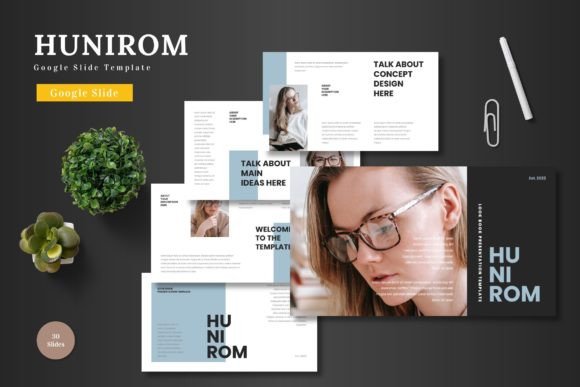
Hunirom: A Clean Google Slides Template for Modern Business Needs
Creating a presentation that feels both professional and visually cohesive can be a real challenge, especially when you're juggling multiple projects or running a business. You need slides that look polished without spending hours tweaking every element. That's where a well-designed template system comes in—not as a shortcut, but as a foundation that lets your content shine. The Hunirom Google Slide Template offers a structured approach to building presentations that are clean, scalable, and ready for a variety of professional contexts.
Understanding the Visual Appeal and Structure
At its core, Hunirom is built on principles of clarity and flexibility. The design avoids unnecessary ornamentation, focusing instead on balanced layouts, ample white space, and a modular grid system. This isn't just about aesthetics; it's about function. Clean slides help guide your audience's attention to the key message—whether that's a business proposal, a product feature, or a quarterly report. The template includes over 150 slides spread across five color variations, giving you a substantial starting point without overwhelming you with choices.
Each color scheme has been carefully developed to ensure contrast and readability. Whether you opt for a bold, energetic palette or a more subdued, professional tone, the typography and graphical elements are designed to work harmoniously. The use of master slides means that changes to fonts, colors, or logos can be applied globally, ensuring consistency across your entire deck. This is particularly valuable for maintaining brand identity, as you can set your primary brand colors and typefaces once and have them reflected throughout.
Practical Applications for Business and Creative Projects
While often associated with corporate settings, a versatile template like Hunirom finds relevance across many fields. For entrepreneurs and small business owners, it can serve as the backbone for investor pitch decks, internal strategy meetings, or client onboarding materials. The inclusion of section break slides helps organize complex information into digestible segments, making lengthy presentations easier to follow.
For those in marketing or content creation, the template's structure supports the development of social media campaign briefs, editorial calendars, or content strategy presentations. The placeholder system for images is intuitive—you can simply drag and drop your photos into designated areas, which saves time and helps maintain visual alignment. This feature is especially useful when preparing visual portfolios or case studies where imagery plays a central role.
E-commerce businesses can leverage the product promotion slides to showcase new launches, highlight features, or present customer testimonials in a visually engaging way. The infographic elements are handcrafted and editable, allowing you to represent data—like sales figures, growth metrics, or process flows—without needing additional design software. Everything is done within Google Slides, making collaboration straightforward and accessible from any device.
Enhancing Brand Consistency and Professionalism
One of the subtle yet powerful benefits of using a cohesive template system is the reinforcement of brand recognition. When every presentation you deliver shares a common visual language—consistent colors, recurring graphic styles, and unified typography—it builds familiarity and trust with your audience. This consistency signals professionalism and attention to detail, which can be decisive in competitive business environments.
The Hunirom template supports this through its master slide architecture. By customizing the master slides, you establish a design framework that ensures every new deck you create aligns with your brand guidelines. This is particularly helpful for teams where multiple people might be responsible for creating presentations. Instead of starting from scratch each time, team members can work within a pre-defined system that maintains visual integrity.
Moreover, the scalability of the elements means your presentations will look sharp whether displayed on a laptop screen, a projector, or even printed as handouts. The vector-based graphics can be resized without loss of quality, which is essential for maintaining a professional appearance across different mediums.
Working with the Template: Tips for Effective Use
Getting the most out of a template like this involves more than just filling in placeholders. Start by reviewing all the slide types available—the gallery layouts, portfolio slides, data visualization options, and text-heavy formats. Understanding what's included helps you plan your content structure more effectively. For instance, if you're preparing a project proposal, you might use the agenda slide to outline your presentation, followed by section breaks to separate problem statement, solution, and implementation timeline.
Take advantage of the color variations. If your brand has a primary and secondary color palette, choose the variation that complements it best. Then, use the theme customization options in Google Slides to adjust accent colors and fonts to match your exact brand specifications. This small step can make a generic template feel uniquely yours.
When adding content, pay attention to hierarchy. Use the provided heading and body text styles to create clear visual distinctions between titles, subheadings, and body copy. This improves readability and helps your audience follow your narrative. If you're presenting data, consider using the infographic slides instead of raw tables—they're designed to make information more accessible and engaging.
Remember that the template is a starting point. Don't be afraid to delete slides that don't serve your purpose or to rearrange sections to better fit your story. The goal is to use the structure as a guide, not a constraint. The more you work with the template, the more you'll discover ways to adapt it to different types of presentations—from formal board meetings to creative brainstorming sessions.
Integrating with Your Broader Design and Marketing Strategy
A presentation template doesn't exist in isolation. It should complement your other design assets—your website, social media graphics, and print materials. The clean, modern aesthetic of Hunirom aligns well with contemporary design trends, making it easier to create a seamless visual experience across touchpoints. For example, you might use similar color schemes or graphic styles in your Instagram stories or email newsletters to create a unified brand presence.
For those who work with clients or stakeholders, having a reliable, professional template streamlines the communication process. It reduces the time spent on formatting and allows you to focus on refining your message. Whether you're pitching a new idea, reporting results, or training your team, the foundation is already laid out—you just need to bring your insights and data to the table.
Ultimately, tools like the Hunirom Google Slide Template are about efficiency and clarity. They remove the friction from the design process, allowing you to produce polished, effective presentations with less effort. In a world where visual communication is increasingly important, having a dependable resource like this can make a meaningful difference in how your ideas are received and understood.