Master Your Presentations with Rucodara - Google Slide Template
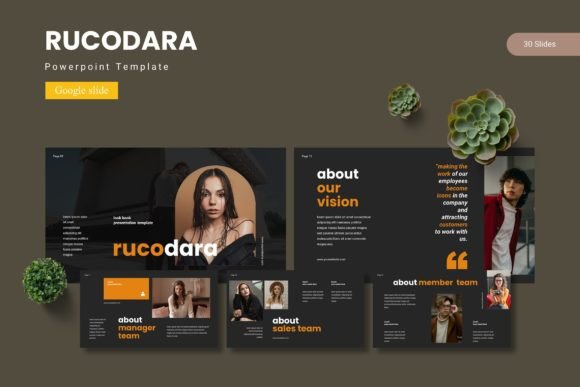
Standing out in a crowded meeting or virtual conference requires more than just bullet points; it demands a narrative that flows as smoothly as your speaking voice. If you have ever sat through a presentation where the text was too small, the colors clashed, or the layout was cluttered, you know how quickly an audience disengages. That friction between your message and the medium is exactly what the Rucodara - Google Slide Template aims to eliminate. By providing a robust framework of over 150 slides and five distinct color schemes, this resource allows you to focus on your strategy rather than wrestling with alignment tools and font choices.
The Power of Visual Consistency
For small business owners and entrepreneurs, your presentation is often a direct reflection of your brand identity. When you are pitching to investors, onboarding new clients, or educating your team, the visual language needs to be consistent. The Rucodara template is built on master slides, which is a technical way of saying that the design is uniform and professional throughout. This structure ensures that every slide feels like part of a cohesive family, reinforcing your brand recognition. Instead of scrambling to match hex codes or resize images manually, you can rely on a system that has already solved those design problems for you.
The inclusion of pixel-perfect illustrations and handcrafted infographics takes this a step further. Data visualization is notoriously difficult to do well. A generic chart can feel cold, but a well-designed infographic can turn dry statistics into a compelling story. With this template, you aren't just getting boxes and lines; you are getting design assets that have been curated to communicate complex ideas simply. This is particularly vital for marketers and content creators who need to break down complex concepts for their audience without losing their attention.
Practical Applications Beyond the Boardroom
While the primary function of the Rucodara template is obviously Google Slides presentations, its versatility extends into other areas of digital marketing and branding. Consider the needs of a blogger or a digital product creator. You might need to create a "lookbook" for your latest collection, or perhaps a media kit to send to potential sponsors. The dedicated gallery and portfolio slides within the template are perfect for this. Because the graphic elements are resizable and editable, you can repurpose these layouts for social media graphics or even web design mockups.
Imagine you are launching a new product line. You could use the template to structure your internal planning, then adapt the color scheme to match your packaging design. The five premade color variations offer a great starting point for experimentation. You can quickly toggle between different palettes to see which one resonates best with your target audience before committing to a final look. This flexibility is a massive asset for creative entrepreneurs who need to move fast and iterate often. It bridges the gap between a rough idea and a polished marketing asset.
Mastering Typography and Readability
One of the most overlooked aspects of presentation design is typography. We have all seen slides where the text is crammed into every available inch of space, making it impossible to read from the back of the room. The Rucodara template addresses this by offering layouts that prioritize readability. However, the template is just a canvas; the fonts you choose to pair with it will define the voice of your presentation.
When selecting a typeface for your slides, think about the "personality" of your brand. Are you a modern tech startup? A sans serif font might be the best fit to convey clean, forward-thinking energy. Are you a luxury brand or a law firm? A classic serif font can lend an air of authority and tradition. The template allows you to swap out fonts easily, so take the time to test different pairings. A common strategy is to use a bold display font for headlines to grab attention, and a more neutral, highly legible font for the body text so your audience can absorb the details without squinting.
Remember that on a screen, less is often more. Avoid handwritten or overly decorative scripts for large blocks of text, as they can become illegible when projected. Instead, use them sparingly for accents or quotes. The goal is to remove cognitive load; your audience should be able to scan a slide and understand the key takeaway within seconds. If they are busy deciphering your font choices, they aren't listening to you.
Streamlining Your Workflow
Time is the most valuable currency for any creative professional. The drag-and-drop picture placeholder feature in the Rucodara template is a massive time-saver. Instead of manually cropping and resizing every image to fit a specific shape or frame, you simply drag your photo into the designated area, and the software handles the rest. This efficiency allows you to populate your presentation in minutes rather than hours.
Furthermore, the inclusion of section break slides is a subtle but powerful tool for pacing. These slides act as visual palate cleansers, signaling to your audience that you are moving to a new topic. This helps with information retention and keeps the flow of the presentation organized. Whether you are preparing a pitch deck, a workshop, or a quarterly report, these structural elements help you organize your thoughts and guide your audience through the journey logically.
Final Thoughts on Design Assets
Investing in high-quality design assets like the Rucodara - Google Slide Template is about respecting your own time and your audience's attention. It eliminates the guesswork and the "blank page paralysis" that often stalls creative projects. By starting with a foundation that is already optimized for visual communication, you elevate the perceived value of your content. It transforms your presentation from a simple slideshow into a polished, professional communication tool that supports your goals, whether that is closing a sale, educating a class, or inspiring a team.