Modern Slides, Minimal Effort: The Untitled Powerpoint Template
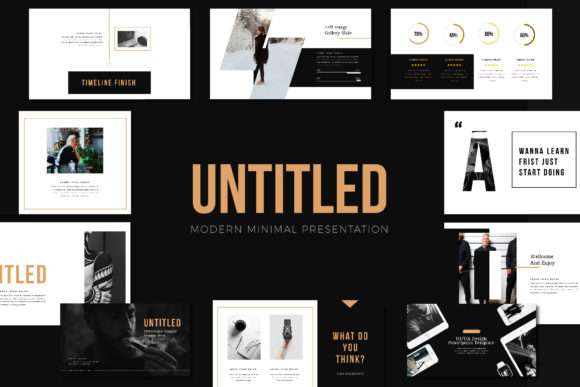
You’ve been there. It’s 10 PM, you have a major pitch deck due tomorrow morning, and you are staring at a blank PowerPoint canvas. The default Calibri font is mocking you, and the urge to just slap a logo on a white background and call it a day is overwhelming. In the fast-paced world of digital marketing and entrepreneurship, time is your most valuable currency. Spending hours wrestling with alignment, color schemes, and layout grids isn't just frustrating; it’s inefficient. This is where a shift in your design toolkit becomes essential. You need a foundation that handles the heavy lifting of aesthetics so you can focus on the message. Enter the Untitled Powerpoint Template, a design asset built specifically for the modern entrepreneur who values both style and speed.
The Psychology of Minimalist Presentation
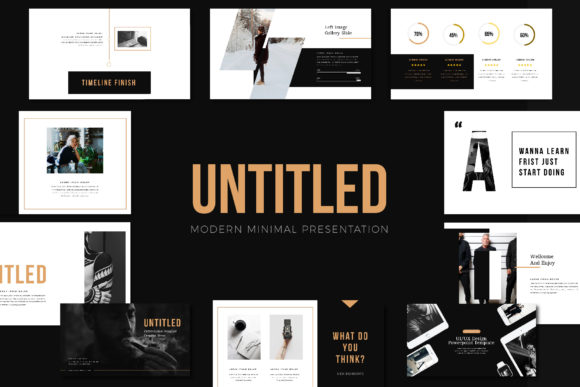
In a world saturated with information, clarity is king. The Untitled Powerpoint Template embraces a "less is more" philosophy, but don't mistake minimalism for boring. This is "ultra-modern" minimalism—think high-end fashion lookbooks, sleek tech launches, and sophisticated agency portfolios. The design utilizes negative space not as empty voids, but as active design elements that direct the viewer's eye exactly where it needs to go.
For those in the fashion, beauty, or lifestyle sectors—specifically the "girlboss" and "ladypreneur" demographics—visual branding is everything. Your presentation is often the first handshake with a potential investor, wholesale buyer, or collaboration partner. A cluttered slide deck can subconsciously signal chaos, while a clean, professionally crafted deck signals competence and confidence. This template bridges the gap between a functional document and a piece of editorial design. It feels less like a slideshow and more like a digital magazine, which is exactly the vibe needed to captivate a modern audience.
Beyond the Pitch: Real-World Applications
While the primary function of the file is a presentation, viewing it solely as a "pitch deck" limits its potential. Think of this PPTX file as a flexible design system. Because it is built on Slidemaster technology, it acts as a robust framework for various visual communication needs. If you are a content creator or a small business owner, here is how you can leverage this asset beyond the boardroom:
- Digital Lookbooks & Catalogues: The layout variations are specifically designed to mimic magazine editorials. You can create a seasonal catalogue for your clothing line or a product lookbook that looks professionally printed, but lives digitally as a PDF or interactive presentation.
- Social Media Content Creation: Stop staring at a blank canvas in Canva. Use the individual slides as templates for Instagram carousels or Pinterest graphics. The 1920x1080 Full HD resolution ensures your images stay crisp, and the unique theme colors allow you to maintain brand consistency across platforms.
- Brand Guidelines & Style Guides: If you are a designer or brand strategist, use the template to present brand identities to clients. The clean layout ensures that the logos, color palettes, and typography you’ve chosen remain the hero of the story, not the slide design itself.
- Webinars and Workshops: For educators and coaches, the "magazine style" layout keeps students engaged. It breaks up information into digestible chunks, using the device mockups included in the pack to show off app interfaces or website designs realistically.
Streamlining Your Workflow with Smart Design
One of the biggest hurdles in customizing premium templates is the technical barrier. We have all downloaded a "premium" asset only to realize that changing one color requires editing the master slide of 40 different variations. The Untitled Powerpoint Template solves this with its automatic color change feature. This is a massive time-saver for anyone managing multiple clients or brand identities. You can switch the entire mood of the presentation from a soft, feminine palette to a bold, corporate scheme in a matter of seconds.
Furthermore, the inclusion of device mockups and icon sets transforms this from a simple slide deck into a comprehensive marketing toolkit. If you are a web designer presenting a mobile-responsive site, you can drop your screenshots directly into the pre-made mockups. The "Drag & Drop" functionality via Slidemaster means you aren't fighting with cropping tools; you are simply placing your content into a professionally curated frame. This allows you to maintain visual consistency—a key factor in brand recognition—without needing advanced skills in complex software like Photoshop or InDesign.
Typography and Visual Hierarchy
A template is only as good as its typography. The creators of this template understand that fonts carry personality. By utilizing free fonts (with links provided in the instruction guide), the template ensures you won’t face licensing issues down the line, which is a common pitfall when using premium serif or sans-serif fonts found in paid marketplaces.
The layout relies on a strong typographic hierarchy to guide the viewer. Headlines are bold and commanding, while body text is spaced for maximum readability. When customizing, pay attention to this balance. If you are using the template for a fashion lookbook, you might pair the bold headers with a delicate script font for quotes to add a touch of elegance. However, if you are using it for a tech startup pitch, stick to the clean sans-serif options to maintain a sharp, modern edge. The template provides the structure, but you provide the voice.
Practical Tips for Customization
To get the most out of this asset, approach it with a strategy. Before you even open the file, have your brand assets ready: your high-resolution logo (PNG format with a transparent background works best), your specific Hex color codes, and your key imagery.
- Curate Your Imagery: Because the design is minimal, your photos do the heavy lifting. Avoid cluttered images. For a "girlboss" or lifestyle aesthetic, use high-quality, well-lit photos with plenty of "breathing room" (negative space) so the text overlays remain legible.
- Use the Mockups: Don't ignore the included device mockups. They are perfect for showcasing digital products. If you are selling an e-book, a course, or a preset pack, showing the product on a screen adds a layer of tangibility and professionalism that static text cannot achieve.
- Check the Aspect Ratio: While the template is set to 1920x1080 (standard 16:9), consider how your audience will view it. If you are sending this as a PDF lookbook, this aspect ratio works perfectly on monitors and tablets. If you are repurposing slides for Instagram Stories, you will need to crop them to 9:16, so keep your key visual elements centered.
Ultimately, the Untitled Powerpoint Template is more than just a collection of slides; it is a launchpad for your visual identity. It strips away the unnecessary noise of over-designed presentations, leaving you with a canvas that is sophisticated, versatile, and ready to be filled with your story. Whether you are closing a deal, launching a product, or building a community, having a reliable, aesthetically pleasing foundation ensures that your presentation is remembered for all the right reasons.