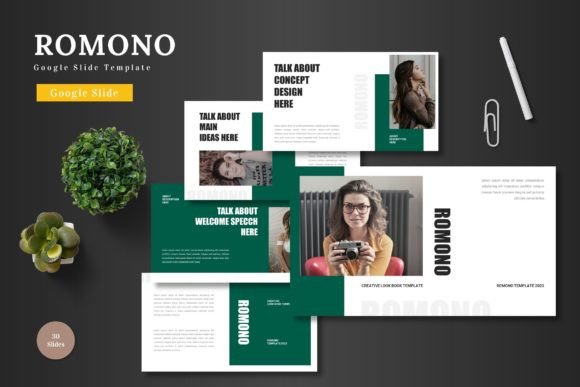
Romono: A Google Slides Template for Clear, Professional Communication
Every presentation is an opportunity. Whether you're pitching a new client, outlining a quarterly strategy to your team, or sharing your expertise at a conference, the slides you create are the visual backbone of your message. A cluttered, inconsistent, or amateur-looking deck can distract from even the most brilliant ideas. Conversely, a clean, cohesive, and professionally designed set of slides instantly builds credibility and helps your audience focus on what you're actually saying. This is where a versatile and well-structured template like the Romono - Google Slide Template becomes an essential tool in your creative and professional arsenal.
Romono isn't just a single set of slides; it's a comprehensive design system. Built within Google Slides, it offers immediate accessibility—no expensive software required. The package includes over 150 total slides, meticulously organized across five distinct color schemes. Each of the five premade themes contains 30 carefully crafted slides, giving you a robust starting point that avoids the "cookie-cutter" look of many basic templates. The inclusion of dedicated section break slides is a practical touch, allowing you to segment your presentation logically, making complex information digestible for your audience.
Beyond Bullet Points: The Power of Visual Storytelling
The real strength of a tool like Romono lies in its ability to transform data and concepts into compelling visual narratives. The handcrafted infographics are particularly valuable. Instead of struggling to build charts and diagrams from scratch, you have access to pixel-perfect illustrations that are not only visually appealing but also fully resizable and editable. This means you can adapt them to fit your specific data points, brand colors, and layout preferences without losing quality. The master slide functionality is the engine behind this consistency. By editing the master, you can ensure that every slide in your deck adheres to your chosen typography, color palette, and logo placement, guaranteeing a polished, unified look from the title slide to the final thank you.
For small business owners and entrepreneurs, this level of professionalism is non-negotiable. Imagine presenting a business plan to potential investors. Using Romono, you can quickly populate slides with your financial projections using clean, easy-to-read charts. You can showcase your product with a dedicated gallery slide, utilizing the drag-and-drop picture placeholder feature to insert high-quality images seamlessly. The five color variations allow you to match the template to your existing brand identity, reinforcing recognition and trust. This isn't about making pretty slides; it's about using design as a strategic asset to communicate value, competence, and clarity.
Practical Applications for the Modern Creator
The utility of a flexible template extends far beyond the traditional boardroom presentation. Content creators and marketers can leverage Romono to streamline their workflow and enhance their output. Consider these practical scenarios:
- Social Media Content: Use individual slides as the foundation for carousel posts on Instagram or LinkedIn. A well-designed infographic slide can become a highly shareable piece of content that drives engagement and positions you as an expert.
- Digital Products & Courses: If you're developing an online course or a downloadable guide, the template provides a consistent framework for your lesson materials, worksheets, and summary pages, elevating the perceived value of your product.
- Client Onboarding & Reports: Create a branded welcome deck for new clients or use the template to structure monthly performance reports. This demonstrates organization and attention to detail, strengthening client relationships.
- Internal Communications: Use it for team meeting agendas, project kickoffs, or training modules. A visually engaging internal document can improve information retention and team alignment.
The "picture placeholder, drag & drop" feature is a significant time-saver for anyone who works with visuals regularly. Instead of manually resizing and positioning each image, you simply drag your photo into the designated area, and the template handles the rest. This allows you to focus on your core message rather than getting bogged down in formatting minutiae. For bloggers and writers, this could mean quickly creating a visual companion piece to a long-form article, enhancing reader engagement and providing a summary that can be easily shared.
Integrating Romono into Your Design Workflow
Adopting a new design asset works best when it complements your existing process. Start by exploring the five color schemes included. Identify which one aligns most closely with your brand or the specific project's mood. From there, dive into the master slides. Customize them first—set your brand fonts, adjust the color palette to your exact hex codes, and add your logo. This upfront investment of 15-20 minutes pays dividends across the entire project, as every slide you create will then automatically inherit these settings.
When building your presentation, resist the urge to use every slide. The template is a library of options, not a linear script. Select the layouts that best serve each section of your talk or document. Use the section break slides to pause and transition between major points. Leverage the infographic and data visualization slides to simplify complex information, but always ensure the data you present is accurate and easy to understand at a glance. The goal is clarity, not decoration.
For those involved in editorial design or creating marketing assets, the template's structure can be a springboard for creativity. A slide layout designed for a team profile could be adapted into an "About the Author" section for a blog. A portfolio grid slide can showcase a series of product images for an e-commerce site or a collection of design work. The editable graphics mean you can change icons, adjust shapes, and modify layouts to fit your unique needs, making the template a truly versatile component of your design toolkit.
Ultimately, the value of a resource like the Romono - Google Slide Template is measured by how effectively it helps you communicate and achieve your goals. It reduces the friction of starting from a blank canvas, provides a professional foundation that builds trust, and offers the flexibility to adapt to a multitude of projects. By taking the time to customize it thoughtfully and use its features strategically, you transform it from a mere collection of slides into a powerful engine for clear, consistent, and impactful visual communication.