Sunesi: Crafting Presentations That Command Attention
We've all sat through them—those presentations where the slides are so cluttered, so disjointed, or so painfully generic that the message gets completely lost. You might have a groundbreaking idea, a revolutionary business plan, or critical data to share, but if your visual delivery falls flat, your audience disengages. This is where the tool you choose becomes as important as the content itself. The right presentation template isn't just about aesthetics; it's about creating a seamless visual narrative that supports and amplifies your voice, ensuring your ideas land with the impact they deserve.
Beyond the Standard Slide Deck: A Visual Toolkit
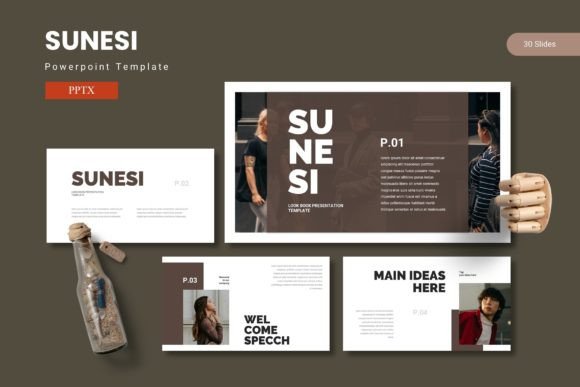
Think of the Sunesi PowerPoint template less as a single file and more as a comprehensive visual communication toolkit. It’s designed for the entrepreneur who needs to pitch investors, the marketing team launching a new product, or the creative professional sharing a portfolio. What sets it apart is the sheer volume of ready-to-use components—over 150 slides across five distinct color schemes. This isn't a one-size-fits-all approach; it's a system built for versatility. You can choose a color palette that aligns perfectly with your existing brand guidelines or a new one you're developing, ensuring visual consistency from the first slide to the last.
The real power lies in its foundational structure. Built on master slides, every element is interconnected. This means when you update a font style or adjust a color on the master, that change ripples through your entire presentation. For anyone building a brand identity, this is crucial. It eliminates the tedious, slide-by-slide tweaking that eats up hours and guarantees a cohesive look. The handcrafted infographics and pixel-perfect illustrations are particularly valuable. Instead of searching for generic stock graphics, you have a library of unique, editable visuals designed to explain complex processes, showcase data, or simply add a layer of professional polish that generic templates can't match.
Practical Applications for Real-World Projects
Let's move from features to function. How does a toolkit like this actually serve your projects? The applications extend far beyond a quarterly business review. Imagine you're a small business owner creating a comprehensive brand guide for your team. You can use the portfolio and gallery slides to display your logo in context, showcase your color palette, and present your typography choices—including complementary display fonts and sans-serif body text—in a clean, organized manner. The picture placeholder feature makes this incredibly efficient; simply drag and drop your assets into predefined spots for a flawless, professional result every time.
For marketers and content creators, the template becomes a dynamic asset for social media graphics and digital products. You could design a series of Instagram carousels or LinkedIn infographics using the infographic slides, then export them as images. The section break slides are perfect for creating clear visual pauses in a webinar or online course, helping to segment information and improve viewer retention. The consistency in design helps build recognition; your audience starts to associate that specific visual style with your brand, strengthening your brand identity with every piece of content you put out.
Matching Design to Your Message and Audience
Choosing a presentation style is a strategic decision. The modern, clean aesthetic of this template lends itself well to industries like tech, consulting, design, and contemporary retail. Its balance of data-friendly layouts and impactful graphics means it can handle a data-heavy financial report just as effectively as a visually-driven product launch. The key is to match the template's personality to your project's goals. Are you aiming for innovative and cutting-edge? Lean into the bolder color schemes and dynamic graphic elements. Is the goal to convey trust and reliability? Utilize the more subdued palettes and structured layouts for a sense of stability.
This is where your understanding of typography and font pairing comes into play. While the template itself is a design asset, the fonts you pair with it complete the story. The included readme file will specify the fonts used, but consider how you might complement them. A strong serif font for headings can add a touch of tradition and authority, while a clean sans-serif ensures readability for body copy. If your brand uses a specific script or handwritten font for a personal touch, test it carefully on a few slides to ensure it harmonizes with the template's grid and visual weight. The goal is a seamless dialogue between the template's structure and your unique brand voice.
Efficiency Meets Professional Polish
Ultimately, a resource like the Sunesi PowerPoint template is about elevating your professional presentation without requiring you to be a graphic design expert. It provides the framework—the master slides, the customizable layouts, the high-quality graphics—so you can focus on what you do best: your content, your strategy, and your message. The drag-and-drop picture placeholders and resizable graphics remove technical barriers, allowing you to work intuitively and efficiently.
Before finalizing any presentation, always run through it with a critical eye. Check for readability from the back of the room—both in terms of font size and color contrast. Ensure your images are high-resolution and your data is clear. Use the section breaks strategically to give your audience a mental breather and to underscore key transitions in your narrative. By combining this powerful, ready-made visual system with your own strategic thinking and content, you move from simply sharing information to making a lasting, professional impression. It’s about having the confidence that your visual delivery is as strong and clear as the ideas you're presenting.