Calnega - Keynote Template: Designing Presentations That Captivate
There's a particular frustration that hits when you open a blank presentation file, knowing the ideas are solid but the delivery feels stale. You've seen it before—the default themes that look like they're from a decade ago, the cluttered slides that bury your message, the inconsistent styling that makes your brand feel amateur. The gap between a good idea and a great presentation often lives in the design, and that's precisely where a thoughtfully built template changes everything.
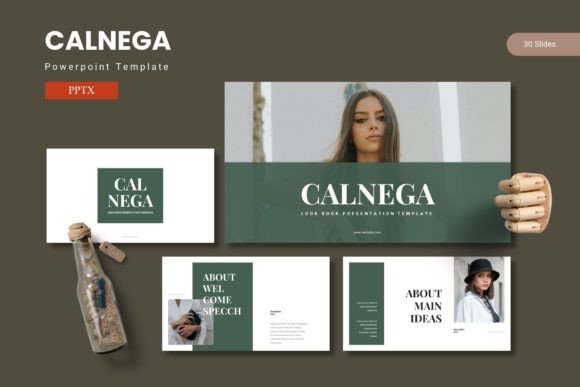
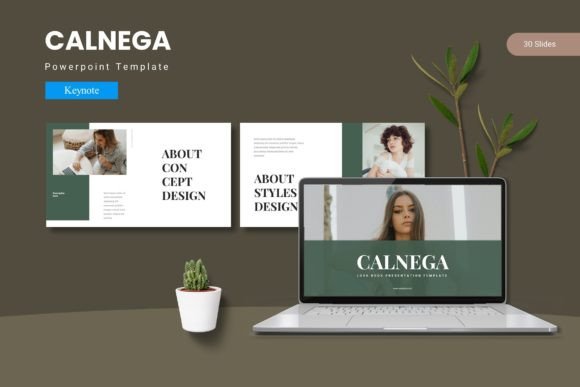
Calnega - Keynote Template steps into that gap with intention. Rather than offering a single static theme, it delivers a system: 150+ slides organized across five premade color schemes, each containing 30 purpose-built layouts. The structure alone tells you something about how it was designed—not as decoration, but as infrastructure for clear communication.
A Design System, Not Just a Collection of Slides
What separates a professional template from a decorative one is coherence. Every slide in Calnega was built on master slides, which means your edits propagate consistently throughout the entire presentation. Change a font once, and it updates everywhere. Adjust a color palette, and the entire deck shifts with it. This isn't just convenient—it's the difference between a presentation that feels polished and one that feels pieced together at midnight before a big meeting.
The five color variations aren't arbitrary swatches chosen to look pretty in a preview. Each one establishes a distinct mood and tonal direction, giving you flexibility depending on whether you're presenting to investors, pitching a creative concept to a client, or sharing quarterly results with your team. Having 30 slides per variation means you're not recycling the same three layouts across 40 minutes of talking. There's breathing room for different content types—data-heavy slides, image-forward compositions, text-driven narratives, and section breaks that give your audience a visual pause.
The Practical Reality of Drag-and-Drop Design
Picture placeholders sound like a minor feature until you've spent forty minutes wrestling with image alignment in a presentation tool. Calnega's drag-and-drop placeholders eliminate that friction. Drop your product photography into a frame, and it fits. Swap in a team headshot, and the proportions are already correct. This matters most when you're working under deadline pressure—when the presentation is tomorrow and the images arrived an hour ago.
The handcrafted infographics deserve particular attention. Data visualization in presentations is notoriously difficult to get right. Default chart templates look generic. Building custom graphics from scratch takes time most people don't have. Calnega's infographics strike a middle ground—they're designed with enough visual sophistication to feel premium, yet structured simply enough that updating numbers and labels doesn't require design expertise. For small business owners presenting sales figures, marketers showing campaign performance, or educators illustrating concepts, these infographics become genuinely useful tools rather than decorative afterthoughts.
Where This Template Actually Gets Used
The applications extend well beyond the obvious corporate presentation. Consider a freelancer building a portfolio to send to prospective clients. The gallery and portfolio slides in Calnega provide the visual framework to showcase work without spending hours designing custom layouts in a separate application. A photographer can display a wedding collection. A copywriter can present campaign samples. A web designer can walk through site mockups. The template becomes a vessel for the work itself.
Brand identity presentations are another strong use case. When you're developing a visual identity for a client—logo concepts, color explorations, typography selections, application mockups—you need a presentation format that doesn't compete with the design work. Calnega's clean layouts let the brand work breathe while still feeling intentional and professional. The section break slides create natural transitions between identity components, guiding stakeholders through the narrative of the brand without visual noise.
Product launches, investor pitches, workshop materials, conference talks, internal training decks, creative briefs—the range is genuinely broad. What connects all of these is the need for visual consistency across many slides, the need to communicate different types of information (text, images, data, concepts) within a single cohesive framework, and the need to look like you know what you're doing. Calnega addresses all three.
Typography and Visual Consistency
One often-overlooked element in presentation design is how typography choices affect readability in a room versus on a screen. A font that looks elegant at 12 points on your laptop might become illegible projected onto a conference room wall at 24 points. The type hierarchy in Calnega was considered with this context in mind—headlines sized for projection legibility, body text balanced for reading from a distance, and sufficient contrast between type weights to establish clear information hierarchy without visual clutter.
This attention to type also matters for brand consistency. If your business uses specific fonts in its marketing materials, website, and social media graphics, your presentations should feel like they belong to the same family. While Calnega comes with its own carefully selected typography, the master slide structure makes it straightforward to swap in your brand's typefaces. This single adjustment transforms a generic template into something that feels authentically yours—a presentation that could only have come from your business.
Pixel-Perfect Illustrations and Resizable Graphics
The included illustrations and graphic elements aren't clip art. They're crafted with the same attention to proportion, line weight, and negative space that you'd expect from a professional design asset library. And because every graphic is resizable and editable, you're not locked into a single visual style. Scale an illustration to fill a full-bleed slide background, or shrink it to serve as a subtle accent element. The flexibility means the same template can produce radically different-looking presentations depending on how you deploy its components.
This editability extends to the broader design philosophy. You're not buying a finished presentation—you're acquiring a toolkit. The five Keynote files included in the package serve as starting points, each one a complete narrative arc ready to be filled with your content, your images, your data, and your voice.
Working Smarter With What's Included
A few practical recommendations for getting the most from a template like this: start by selecting your color variation based on the emotional tone of your content, not just personal preference. A financial report reads differently in muted blues than in vibrant oranges. Next, audit the 30 slides available in your chosen variation and mark the ones that fit your content structure before you start editing—this prevents the common trap of forcing content into layouts that don't serve it.
Pay attention to the section break slides. They're not filler. Used deliberately, they create rhythm in your presentation, giving audiences a moment to absorb what they've just seen before moving to the next topic. In longer presentations especially, these visual pauses prevent the numbing effect of slide after slide of dense content without relief.
The readme file included in the package isn't optional reading—it contains font information and photo credits that will save you time during setup. Installing the specified fonts before opening the Keynote file prevents the layout shifting that happens when a system substitutes default fonts for missing ones. It's a small step that prevents a cascade of formatting problems.
For the Person Building the Presentation
Whether you're a marketing professional assembling a campaign recap, an entrepreneur preparing for a pitch competition, a teacher designing course materials, or a creative director presenting concepts to a client, the underlying need is the same: you want your presentation to support your message, not distract from it. You want to spend your energy on the content and the delivery, not on pixel nudging and alignment troubleshooting.
Calnega - Keynote Template is built for that person. It respects your time by providing a structured starting point that's already visually refined. It respects your audience by maintaining the kind of design quality that signals professionalism and care. And it respects the reality that most people building presentations aren't full-time designers—they're professionals in other fields who need their visual communication to match the quality of their ideas.
The best presentations don't just inform. They create an experience—a visual journey that carries an audience from curiosity to understanding to conviction. Having the right infrastructure to support that journey makes all the difference between slides people forget and presentations people remember.