Instant Sparkle: Using Glitter Text Effects for Brand Impact
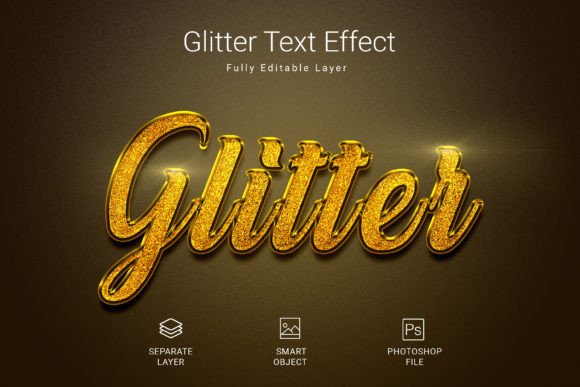
If you’ve ever stared at a blank artboard wondering how to make a headline pop without spending hours learning complex 3D rendering, you know the frustration. We all want that "wow" factor for our digital assets, but the timeline rarely allows for it. This is where a solid Glitter Psd Text Style Effect Mockup becomes an essential part of your toolkit. It offers a rapid, high-impact solution for adding texture and luxury to your typography. Instead of manually painting highlights and shadows to simulate a sparkling surface, this effect allows you to apply a polished, realistic aesthetic to your text, shapes, or vector logos in just a few clicks.
The real value of this specific asset lies in its balance of speed and quality. We are looking at a high-resolution file (3000×2000 pixels) designed at 300 DPI. For those who aren't deep into print production specs, this simply means the texture will look crisp on a computer screen and won't turn into a pixelated mess if you decide to print it on a poster or physical packaging. It bridges the gap between digital convenience and professional output.
The Psychology of Sparkle: Why Texture Matters in Branding
In visual communication, texture conveys emotion. A matte finish suggests earthiness and calm; a glossy finish implies modernity and sleekness. Glitter, however, is in a category of its own. It signals celebration, luxury, and high energy. When you use a Glitter Psd Text Style Effect Mockup, you aren't just adding a filter; you are invoking a specific psychological response from your audience.
Think about the industries where this makes sense. Event planners need typography that screams "party." Beauty brands often rely on shimmer to suggest glamour and self-care. Children’s brands use sparkle to convey magic and wonder. Even in the tech sector, a touch of iridescence can make a launch feel like a major event. By utilizing a premium font effect like this, you are aligning your visual identity with feelings of excitement and premium value. It helps cut through the noise of flat, boring designs that dominate the average social media feed.
Practical Applications: Where to Apply Your Glitter Effect
One of the strongest features of this particular design asset is its versatility. Because it utilizes Smart Objects, it is not limited to just one type of project. Here is how different creatives can leverage this style:
- Social Media Graphics: In the endless scroll of Instagram or TikTok, you have about one second to grab attention. A glittering headline on a promotional post or a "New Arrival" banner stops the thumb. It adds a tactile quality to a flat screen.
- Logo Design Accents: While a full glitter logo might be difficult to reproduce in single-color print, using this effect for the "watermark" version of your logo or the primary logo used on digital platforms can elevate the brand's perceived status. It works exceptionally well for beauty, fashion, or lifestyle brands.
- Invitations and Greeting Cards: Whether it's a wedding invitation or a holiday sale flyer, the sparkle effect mimics the look of embossing or foil stamping. This allows you to create a digital proof that looks exactly like the intended physical product.
- Website Headers: For e-commerce sites, especially those selling jewelry, accessories, or party supplies, using this effect on key landing page headers can direct the user's eye to the call to action.
- Merchandise Mockups: If you are designing T-shirts or tote bags, applying this effect to your typography helps visualize how metallic inks or glitter vinyl might look on the final product.
Streamlining Your Workflow with Smart Objects
If you are a small business owner wearing the "designer" hat, or a busy freelancer juggling multiple clients, efficiency is currency. The standard method for creating realistic text effects in Photoshop involves layer styles, blending modes, and manual masking. It is time-consuming and requires a decent amount of technical skill.
The Glitter Psd Text Style Effect Mockup simplifies this through the use of Smart Objects. The process is intuitive: you simply locate the designated layer, double-click to open the Smart Object, paste your vector logo or type your text using the included free font, and hit save. The main file automatically updates, wrapping your design in the glitter texture with realistic lighting and shadows.
This "non-destructive" workflow means you can change your mind five minutes later without breaking the file. Want to try a different tagline? Just go back into the Smart Object, change the text, and save again. It removes the fear of "ruining" a design and encourages experimentation.
Technical Excellence: Why Resolution and Color Mode Matter
It is easy to overlook the technical specifications of a design asset until things go wrong. How many times have you downloaded a free resource only to find it is 72 DPI and looks blurry when scaled up? This specific mockup is built for professional use.
The RGB color mode is optimized for digital screens, ensuring the colors pop on monitors and mobile devices. However, the 300 DPI resolution ensures that if you need to pull a hero image for a printed brochure or a physical poster, the integrity of the design remains intact. The file size of 3000x2000 pixels gives you ample canvas to work with, allowing you to crop in for close-up details or scale down for smaller icons without losing quality.
Furthermore, the inclusion of a free font is a thoughtful touch. Often, buying a premium font just to test it out in a mockup isn't feasible. By including a typeface that pairs well with the effect, the creator ensures that your first click produces a result that looks intentional and curated.
Design Tips: Balancing Sparkle with Professionalism
While a glitter effect is a powerful tool, it comes with a warning label: moderation is key. As a designer or brand strategist, you know that overusing a high-energy texture can make a brand look cheap or chaotic. Here are a few tips for integrating this effect into a mature, professional identity:
- Use it as an Accent: Don't apply the glitter effect to your body copy. It will be unreadable. Use it for headlines, sub-headers, or single keywords that you want to emphasize.
- Pair with Clean Typography: Contrast is your friend. If your headline is a sparkling, decorative display font, ensure your body text is a clean sans-serif or a highly legible serif. This grounds the design and maintains readability.
- Mind the Background: Glitter effects usually have their own highlights and shadows. Placing them on a very busy, high-contrast background can make the text hard to decipher. Solid colors or subtle gradients often work best as a backdrop.
- Check Commercial Licensing: Before using any design asset in a client project or for merchandise you intend to sell, always double-check the license. Most premium mockups allow for commercial use, but it is your responsibility to ensure you are compliant.
Ultimately, the goal is to enhance your message, not overshadow it. This Glitter Psd Text Style Effect Mockup provides the texture and quality; it is up to you to apply it with strategic intent. Whether you are designing a birthday invitation or a high-end cosmetic ad, the ability to instantly add this level of polish is a game-changer for your visual communication strategy.