Achieve Instant Glass Morphism with This PSD Mockup
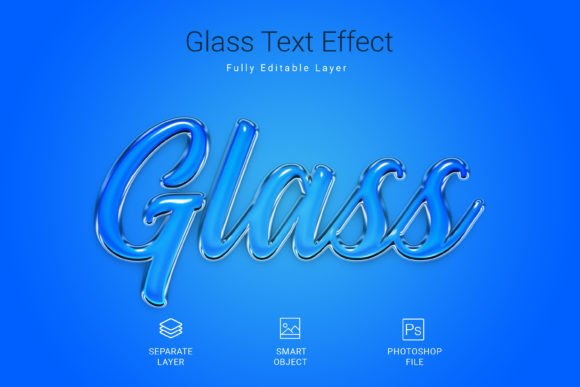
Let’s be honest: creating realistic 3D text effects from scratch in Adobe Photoshop is a headache. Between managing layers, adjusting bevels, and trying to get the lighting just right, you can spend hours on a single headline. If you are a designer, a content creator, or a small business owner trying to get high-quality marketing materials out the door quickly, you need a faster workflow. This is exactly where the Glass Psd Text Style Effect Mockup steps in. It offers a seamless, professional way to apply that trendy, high-quality glass morphism style to your text, shapes, or vector logos in just a few clicks.
Unlike generic filters, this mockup is built for professional output. It utilizes the power of Adobe Photoshop Smart Objects to ensure your design remains crisp and editable. The concept is simple but powerful: you are supplied with a fully structured PSD file where the heavy lifting has already been done. The lighting, the refraction, and the depth are all pre-calculated. All you have to do is replace the placeholder content with your own branding. It is designed to give you that "premium font" aesthetic without the premium price tag of time.
The Power of Smart Objects in Modern Typography
The core of this asset lies in its functionality. If you have ever struggled with making text look "real," you know that flat design is sometimes not enough. Sometimes, you need depth. You need transparency. You need that frosted glass look that is dominating modern web design and social media graphics right now.
This Glass Psd Text Style Effect Mockup works through a non-destructive workflow. This means your original artwork is never damaged. You simply click on the designated Smart Object layer, paste your text or logo, save, and close. The PSD file automatically applies the glass effect, complete with shadows and highlights, to your specific design. This is particularly useful if you are working with different typeface options. Whether you are using a bold sans serif font for a tech startup or a flowing script font for a wedding invitation, the glass effect adapts to the contours of the letters.
Technical Specifications That Matter for Print and Digital
When you are downloading design assets, technical specs are not just boring numbers—they are the difference between a blurry logo and a sharp billboard. This mockup comes in at a substantial 3000x2000 pixel size. Why does this matter? It means you have the resolution to use this for large-scale print materials like posters or trade show banners without worrying about pixelation.
Furthermore, the file is set to 300 DPI in RGB color mode. While RGB is standard for screens, 300 DPI ensures that if you do need to convert this for high-quality print flyers or packaging design, the integrity of the image holds up. It is a versatile starting point for almost any visual medium you can imagine.
Practical Applications: From Branding to Merchandise
How do you actually use a glass effect in the real world? It is more versatile than you might think. The aesthetic of transparency and light plays well across various industries. Here are some specific scenarios where this mockup shines:
- Logo Design & Brand Identity: If you are working on a brand identity for a client in the tech, beauty, or luxury sector, a glass effect adds a layer of sophistication. It suggests clarity and modernity. You can use this to create secondary logo variations for watermarks or hero images on websites.
- Social Media Graphics: Platforms like Instagram and Pinterest are visual battlegrounds. A flat text post often gets scrolled past. However, a post featuring a Glass Psd Text Style Effect on the headline catches the eye because it interacts with light. It feels tactile and expensive.
- Editorial Design & Blogs: For bloggers and publishers, creating feature images that stand out is crucial. Using this effect for article headers can establish a consistent, high-end look for your editorial design. It pairs beautifully with minimalist photography.
- Digital Products & Packaging: If you sell digital goods, like templates or presets, the cover art matters. This mockup can make a standard sans serif font look like an embossed label on a glass bottle, which is perfect for packaging design concepts or cosmetic branding.
- Invitations & Stationery: For the crafters and event planners, imagine using this for the text on a digital invitation. It adds a touch of elegance that standard flat colors cannot achieve, making it ideal for gala events, weddings, or upscale parties.
Enhancing Visual Consistency and Professional Presentation
One of the biggest challenges in design is maintaining consistency. When you are a small business owner wearing many hats, your visuals can start to look disjointed. You might use a filter here, a different style there. By utilizing a standardized asset like this PSD mockup, you can ensure that every time you create a promotional graphic, it has the same "glass" finish. This repetition builds brand recognition.
Moreover, the "professional presentation" aspect cannot be overstated. There is a psychological effect on the viewer when they see high-fidelity graphics. It implies that the brand behind the graphic cares about quality. It suggests that if they care this much about their visuals, they probably care that much about their product or service. This is a subtle form of persuasion that marketers and creative entrepreneurs leverage constantly.
Tips for Font Pairing and Readability
While the effect is stunning, you must be careful about readability. Glass effects involve light refraction and blur, which can sometimes make fine details hard to read. Therefore, choosing the right font is critical.
Avoid using overly thin or intricate handwritten fonts for large blocks of text with this effect. The distortion might make the letters illegible. Instead, pair the glass effect with a sturdy display font or a bold serif font. The thickness of the letters will withstand the visual noise of the glass refraction.
Here is a practical workflow for testing:
- Select Your Typeface: Start with a font that has a strong silhouette. Think modern typography styles—geometric sans-serifs or modern serifs work best.
- Apply the Mockup: Use the Smart Object to apply the effect.
- Check the Background: Glass reflects its environment. If you place this text over a very busy, high-contrast background, the text might get lost. Test the effect over both light and dark backgrounds to see where the glass "pops" best.
- Scale Appropriately: Because this is a high-res file, you can scale your text quite large. Use this to your advantage for poster designs where the text needs to be seen from a distance.
Workflow Efficiency for Busy Creators
Time is money, especially for freelancers and agencies. The traditional method of creating a glass effect involves multiple layers: a background layer, a blur layer, a highlights layer, a shadow layer, and a color overlay. Managing these takes time and processing power.
This Glass Psd Text Style Effect Mockup condenses that process. By using the provided PSD file, you skip the setup and go straight to the customization. This efficiency allows you to focus on other aspects of the project, such as copywriting, layout, or client communication. It is a tool designed to speed up production without sacrificing the "high-quality" look that clients demand.
It is also worth noting the versatility of the asset beyond just text. The prompt mentions using it on shapes and vector logos. This is a massive advantage. If you have a client with a simple icon logo, you can apply this effect to create a 3D version of their icon for use on their website header or business card background. It effectively doubles the utility of the asset.
Final Thoughts on Licensing and Usage
As with any commercial font or design asset, always double-check the licensing terms. While this specific mockup comes with a free font and is fully editable, ensure that your end-use complies with the license provided by the creator. Most mockups allow for use in end products for sale (like a printed t-shirt or a digital social media template), but they usually prohibit reselling the PSD file itself.
For designers, entrepreneurs, and hobbyists alike, having a toolkit of high-quality effects is non-negotiable in a crowded digital landscape. The Glass Psd Text Style Effect Mockup is not just a visual trick; it is a functional asset that bridges the gap between a standard idea and a polished, market-ready product. Whether you are designing a new brand identity, crafting social media graphics, or laying out a magazine, this effect provides the polish needed to make your work stand out.