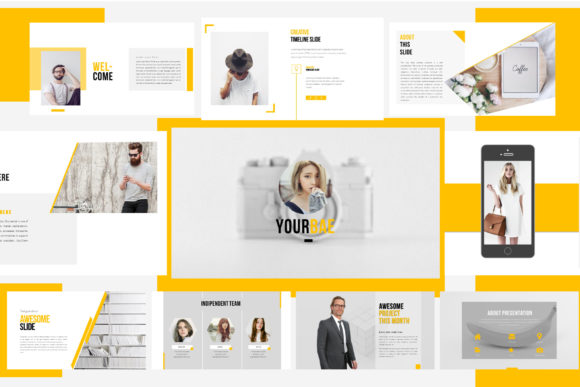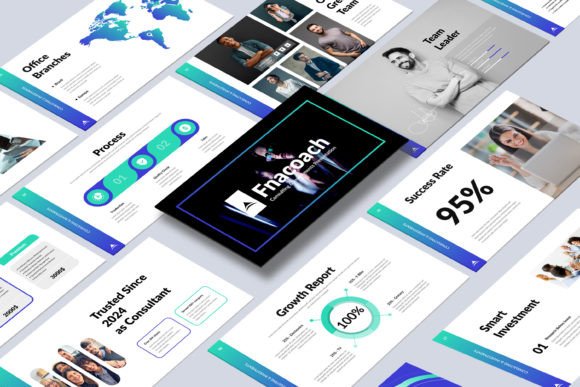
Transform Your Pitch with the Investments Presentation Template
Every entrepreneur, startup founder, and financial advisor knows the moment: you have the data, the plan, and the passion, but the presentation falls flat. A great idea can get lost in a cluttered slide deck, dense text, and mismatched charts. The gap between a promising opportunity and securing funding often lies in the clarity and professionalism of your visual communication. This is where a structured, professionally designed framework becomes not just helpful, but essential. It’s about telling a compelling financial story that resonates with decision-makers.
A Framework for Financial Storytelling
The Investments Presentation Template is built as a visual engine for persuasion. It moves beyond basic bullet points to create a narrative flow that guides your audience logically from the problem to your solution, and finally to the compelling financial opportunity. The structure is intentionally designed to mirror the due diligence process investors follow. It begins with a high-level executive summary to capture immediate interest, then dives into detailed market analysis and your unique investment thesis. By presenting financial projections and risk assessments through clean, integrated charts and graphs, it transforms complex numbers into understandable insights. This methodical approach builds credibility and allows your core message to shine through without visual distractions.
What makes this template particularly effective is its adaptability across the diverse landscape of modern investment. Whether you are pitching a tech startup, presenting a real estate development fund, outlining a venture capital strategy, or detailing a portfolio of stocks, the modular slide design allows you to emphasize the most relevant sections. You can seamlessly shift focus from growth metrics for a SaaS company to property valuations and rental yield projections for a real estate deal. This flexibility ensures your presentation is always tailored to the specific vehicle and audience, making it a versatile asset in any professional's toolkit.
Practical Applications Beyond the Boardroom
While its primary function is clear, the design principles and assets within this kit extend to numerous branding and marketing scenarios. The clean, modern typography and consistent color palette establish a strong visual identity that can be carried across all your materials. This is critical for building brand recognition and trust from the very first point of contact.
Consider these practical uses for the design assets and layout philosophy:
- Investor Relations Materials: Use the slides as a foundation for quarterly update decks, annual reports, or fund performance summaries. The professional aesthetic reassures stakeholders of your operational competence.
- Internal Strategy Documents: Adapt the market analysis and financial projection slides for internal planning sessions, helping your team align on goals and metrics with data-driven visuals.
- Website & Blog Content: Extract the key charts, infographics, and section headers to create compelling visual content for your website's "About" or "Our Strategy" pages, or for detailed blog posts explaining market trends.
- Social Media Graphics: Use the consistent visual style to create branded quote cards, data snippets, or announcement graphics for LinkedIn and Twitter, reinforcing your professional image.
- Print Collateral: The high-resolution (1920×1080) design translates well to printed one-pagers, executive summaries, or conference handouts, ensuring your brand looks sharp in any format.
Design Details That Drive Engagement
Visual appeal is not about decoration; it's about communication. The template's power lies in its thoughtful design choices that enhance readability and focus. The 16:9 aspect ratio is optimized for modern screens, from laptops to projectors, ensuring your content is always displayed correctly. The Master Slides layout is a game-changer for efficiency and consistency. By editing a single master slide, you can update fonts, colors, or logos across all 50 slides instantly, guaranteeing a unified look without tedious manual changes.
The inclusion of drag-and-drop photo replace functionality simplifies the process of adding custom imagery, team photos, or product shots, making the template feel uniquely yours. Furthermore, the use of free fonts removes a common barrier, allowing you to download and use the presentation immediately without worrying about additional licensing costs for personal or commercial projects. This focus on user-friendly editing empowers you to concentrate on your message rather than wrestling with the software.
Choosing and Implementing Your Template
Selecting a presentation template is similar to choosing a core typeface for a brand—it sets the tone. This particular framework uses a combination of clean sans-serif fonts for body text and impactful display fonts for headings, a pairing that balances professionalism with modern appeal. When you download the PowerPoint (PPTX) and Illustrator (EPS) files, take time to review the included help file. It will guide you through the specific features and best practices for editing.
Before you populate the slides with your data, consider these implementation tips:
- Customize with Purpose: Don't just change the colors to your brand palette. Ensure the color contrast maintains readability, especially for text on charts and graphs. The goal is clarity, not just style.
- Pair with Complementary Materials: Use the same font families and color codes from the template in your supporting documents—a business plan PDF, a leave-behind one-sheet, or your email signature. This creates a seamless brand identity.
- Test Your Flow: Use the structure as a guide, but adapt it to your story's unique rhythm. You might merge or reorder sections to best highlight your strongest points. The template provides the framework; you provide the narrative.
- Leverage the Assets: The included EPS files are vector-based, meaning you can scale elements like icons or logos to any size without losing quality. Use these in other design assets like posters or web graphics for perfect consistency.
In the end, a powerful investment presentation is about more than showcasing numbers—it's about building confidence. By using a template that is both visually engaging and logically structured, you demonstrate an attention to detail and a respect for your audience's time. It allows you to present your opportunity with the polish and professionalism it deserves, turning complex data into a clear and compelling call to action. This tool is designed to help you bridge that final gap, ensuring your brilliant idea gets the visual platform it needs to succeed.