Alenia: A Modern Media Kit Template for Polished Presentations
Staring at a blank presentation slide can feel paralyzing. You have the content, the data, the brand story, but arranging it into something visually compelling is a different challenge entirely. Generic templates often feel recycled, with the same layout repeated on every slide, making your hard work look like an afterthought. This is where a thoughtfully designed asset like the Alenia Media Kit Powerpoint template shifts the experience. It’s not just a collection of slides; it’s a curated visual system designed to make your content the hero.
Beyond the Basic Slide Deck: A Visual Identity Toolkit
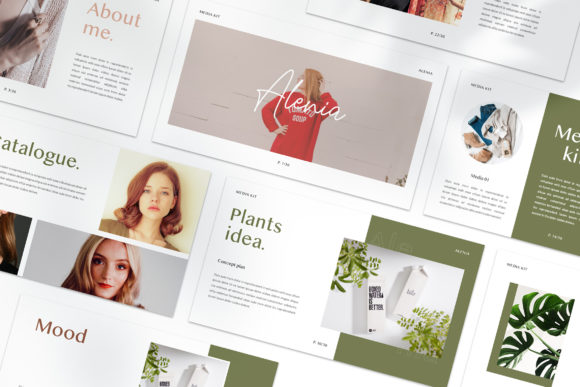
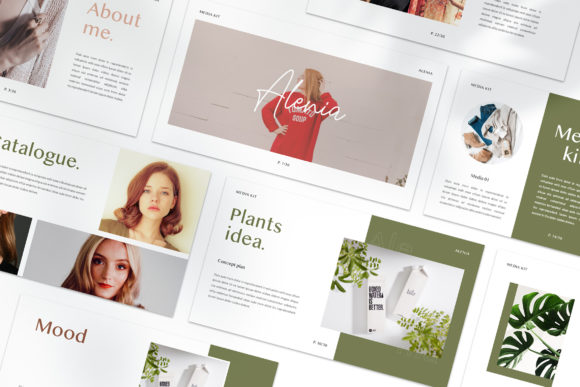
Alenia distinguishes itself by treating each slide as a unique composition. This approach mirrors how a professional designer would construct a media kit or brand presentation—every page has its own purpose and visual rhythm. The "lookbook and magazine style layout" isn't just a buzzword; it translates to asymmetric grids, dynamic text placement, and ample space for high-resolution imagery. For a small business owner putting together a pitch for investors, or a content creator designing a media kit for brand partnerships, this variety is crucial. It allows you to showcase different types of information—team bios, service lists, project portfolios, testimonials—without the presentation feeling monotonous or repetitive.
The practicality of the "Made with Slidemaster" feature cannot be overstated. For those who aren't PowerPoint experts, the ability to simply drag and drop your own images into pre-designed placeholders is a game-changer. It removes the technical barrier, letting you focus on your message. The automatic color change feature is another subtle but powerful tool. It ensures visual consistency across all slides when you apply your brand's primary and secondary colors, reinforcing brand recognition with minimal effort. You're not just using a template; you're adapting a flexible framework to become an extension of your own brand identity.
From Digital Presentations to Tangible Brand Assets
While the immediate use-case is a standout presentation, the real value of a cohesive media kit template lies in its versatility across multiple marketing channels. The high-resolution 1920x1080 pixel format is perfect for digital use, but the design principles extend far beyond the screen.
Imagine extracting a beautifully typeset section for a social media graphic. The magazine-style layouts, with their bold typography and clean lines, translate seamlessly into Instagram carousels or Pinterest pins that demand attention. For a blogger or entrepreneur, this means your presentation materials and your social presence can share the same sophisticated visual language, strengthening your overall brand coherence.
The templates can also inform your print strategy. The layout ideas are excellent starting points for designing one-page brand summaries, product spec sheets, or even event invitations. The focus on clean, modern typography and balanced whitespace ensures that any printed material will look professional and legible. This is particularly important for packaging design mockups or product inserts, where clarity and aesthetic appeal directly influence customer perception. By starting with a unified design system like Alenia, you create a suite of assets that feel connected, whether a customer encounters your brand on a tablet, a phone screen, or a printed brochure.
Designing for Clarity and Connection
A common pitfall in presentation design is prioritizing style over substance. Alenia seems to strike a deliberate balance. The "free font used" is a practical consideration, ensuring you can replicate the exact look without hunting for or purchasing additional fonts. The inclusion of a "Help & Instruction pdf" points to a user-centric design philosophy, acknowledging that even the best tool needs a guide.
When applying a template like this, your role shifts from layout technician to content curator. Your focus should be on selecting the right slide for the right message. Use a bold, image-centric slide to introduce your brand's mission. Choose a more text-focused, structured layout to detail your services or pricing. Employ a grid-based slide to showcase a portfolio of work. This intentionality in slide selection is what will make your presentation feel professional and engaging. It forces a clarity of thought that benefits both you as the creator and your audience as the viewer.
Remember, the images used in the preview are for illustration. This is a blank canvas. The real magic happens when you populate it with your own photography, your team's headshots, your product images, and your brand's specific color palette. The template provides the sophisticated structure; you provide the authentic story. In a world saturated with generic content, that combination of professional design and personal authenticity is what truly captures and holds attention, turning a simple presentation into a memorable brand experience.